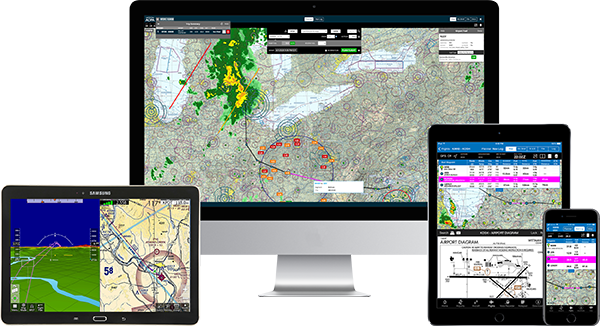
Real-time Flight Planner

AOPA Real Time Flight Planner Notice

AOPA will retire the Real Time Flight Planner on January 16, 2009.

Click here for the NEW AOPA Internet Flight Planner.

PRINT THIS PAGE FIRST!

Download:   Site 1   Site 2

How to download and start AOPA's Real-Time Flight Planner (RTFP)

NEW! Version 1.2.3 is now available for downloading.

System Requirements

File download size: 1.8 MB (Approximate 15 minutes on a 56K connection)

Disk space: 5.1 MB

PC: Supported operating systems: Windows 98, Windows 2000, Windows ME, Windows NT 4.0 or higher, and Windows XP
Memory requirements: 128 MB of RAM
Processor speed: 266 MHz or higher

MAC: Requires Virtual PC—G4 running Virtual PC for Mac
Supported operating systems: Mac OS 10.2.6, Mac OS 10.2.8 running Connectix Virtual PC for Mac 5.04 or higher and Windows XP Home
Memory requirements: 384 MB of RAM
Processor speed: 400 MHz or higher

Supported browsers: Internet Explorer version 5.0 or higher, Netscape and other browsers based on the same or similar technology and protocols

NOTE: Some users may need administrative privileges to install this application. Please see your network administrator.

To resolve download problems caused by firewalls, please see FAQs.

Mac users, see FAQs for additional information on Virtual PC for Mac.

Download the Help file (605-KB PDF)
Tutorial

  1. Click one of the above two links to download the RTFP program.
    • It is the same program at both sites; there are two available for speedy access.
    • Your browser should open a new Web page with the License Agreement for the RTFP. Please review the Terms and Conditions of Use. You will need to accept the agreement in order to access the download page for AOPA's Real-Time Flight Planner application (1.8 MB).

  2. Click the "AOPA's Real-Time Flight Planner" link on the download page.
    • This will bring up a "File Download" splash screen.
      Select "Save this program to disk." This will save the program file to a location on your computer that you specify. You will be able to complete the installation at a future time.
      Or you can select the "Open" option to run the installation wizard immediately after the download finishes.

      NOTE: Download time will vary depending on your computer connection speed. On average, it will require approximately 15-20 minutes using a 56K modem to complete the download.

  3. Click on "Open" or "Open Folder" depending on where you saved the application.
    • If you saved the application for later use, you will need to locate the file RTFPSetup.exe on your computer. You can use the Search or Find function on the Start menu for this. (If you checked the box "Close this application when download completes," you will need to locate the application file and open it manually.)
    • You will now see an AOPA Real-Time Flight Planner setup splash screen.
    • License Agreement: Click "I agree" after you have reviewed Terms and Conditions of Use. (Anytime there is a version upgrade, you will need to review and agree to the Terms and Conditions of Use).
    • Choose Components: Click "next."
    • Choose Install Location: Select the default "Destination Folder" or browse and select a different folder
    • Click "Install." Most users will want to select the default location as it is shown.

      When installation is complete, you will be asked if you'd like to start AOPA's Real-Time Flight Planner. If you wish to continue later, click "No." You will be able to start the flight planner at a later time by double clicking on the shortcut icon on your computer's desktop.

  4. Double click on the shortcut to start the program.
    • You will need to establish an Internet connection if you have not already connected to the Internet. You will be connected to one of the three RTFP servers, and you will be presented with the Real-Time Flight Planner login screen.
    • Enter your AOPA User ID and Password in order to start the planner. It is the same login information that you use to access the member's section of the AOPA Web site. If you have forgotten this information, you can directly access the AOPA Online Member Login page for help by clicking on the link provided on the RTFP login screen. Or call the AOPA Pilot Information Center at 800/872-2672 (800/USA-AOPA). If you are not an AOPA member, you can join online by clicking on the link provided on the RTFP login screen or you can call AOPA at 800/872-2672.

NOTE: The first time you use the flight planner, it will take approximately two minutes to retrieve graphical information including the TFRs and geographic map. Subsequent start-ups will take less time.

You may send comments about AOPA's Real-Time Flight Planner to our help department.

If you know of any information that needs to be corrected for your home base or for an airport you frequently visit, please e-mail AOPA's Airport Directory.

Updated Friday, August 11, 2006 10:58:57 AM

AOPA Aircraft Financing Program
Let's Keep It That Way
Time is running out to win this Cirrus SR22 GTS
ASF Safety Quiz - How do you measure up?
Car rental discounts for AOPA Members
Want to win up to $5,000 for flight training?
Get closer to your dream - Win up to $5,000!
Leave your legacy - Join the AOPA Legacy Society
Aviation eBrief - subscribe now