On the level
Managing a level-off with an autopilot
By Bruce Williams
You have been cleared for the RNAV (GPS) RWY 9 approach at William R. Fairchild International Airport (CLM) at Port Angeles, Washington, which lies along the Strait of Juan de Fuca on the north side of the Olympic Peninsula.


The density altitudes for the LPV and LNAV/VNAV minimums aren’t available today because a temporary construction crane lurks along the final approach course. You can descend to the LNAV minimum descent altitude (MDA) of 960 feet msl (about 675 feet agl), comfortably below the reported overcast at 900 feet. But the visibility is fluctuating between one-half and three-quarters statute mile, and at least one-half statute mile is required. Fortunately, Runway 9 has an approach lighting system (ALS).
The chart profile view reveals another challenge. Assuming the satellite signals are valid, your WAAS-capable navigator will show LPV when the final approach fix becomes active. There’s no way to tell the box to disregard the LPV minimums unless the database contains a separate RNAV (GPS) approach with only 2D (nonprecision) minimums. The system will display, and you can follow, the LPV glidepath from the final approach fix at OCUVI to the MDA, but the visual descent point (VDP), where that glidepath intersects the MDA, is 2.1 nautical miles from the missed approach point at the threshold. The runway probably won’t appear through the mist as you reach the VDP.
Your standard practice when flying 2D approaches is to treat a VDP as a decision point. If you don’t see the runway environment as you approach the MDA, you go missed. (See “Visual Descent Points as Decision Points,” January 2026 AOPA Pilot and “Decision Time,” September/ October 2025 Flight Training.) But if you want to land at CLM—it’s a long drive otherwise—you’ll have to level off at the MDA and continue past the VDP toward the runway. You’re in a Cessna 182, and the runway is about 6,300 feet long, leaving a comfortable margin for a smooth descent from the MDA even if the lights and runway appear only half a mile from the threshold.
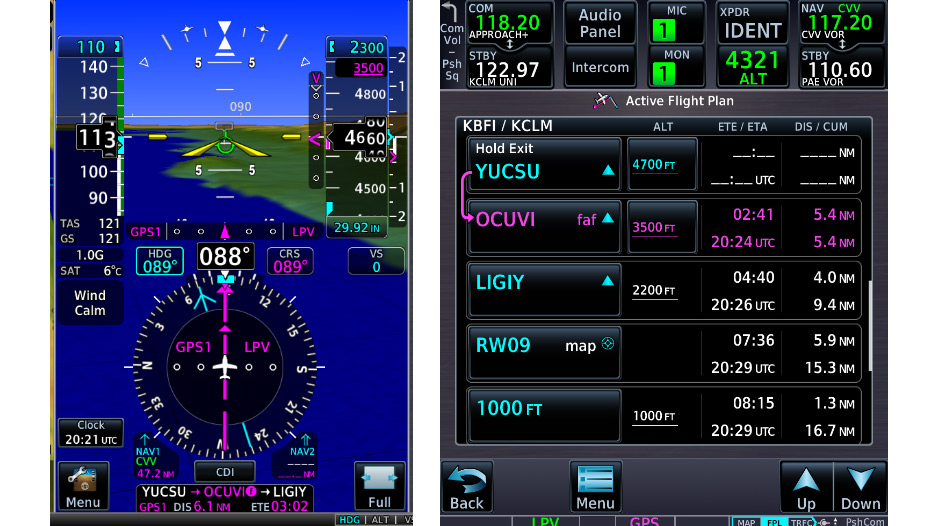

You want to let the autopilot fly this approach as long as possible so that you can divide your attention between the panel and looking outside for the runway, as if you were operating as a two-pilot crew. But the autopilot doesn’t distinguish between approved (LPV) and advisory (+V) glidepaths, and it will follow vertical guidance to the touchdown zone, even if you set the MDA in the altitude preselect window. You must make the autopilot stop the descent as you approach the MDA—and not dip below that altitude—as it continues to track the final approach course toward the missed approach point. Even if you choose to hand-fly and follow flight director cues, selecting the correct autopilot modes is critical during this phase of flight.
The question now, as you turn inbound from the hold at YUCSU, is how to manage the automation. Can you press ALT to capture the MDA and preserve lateral guidance? Would pressing the LVL button provide the same options? Should you use another technique, such as descending in vertical speed (VS) mode?
Pilot guides don’t always clearly explain the cumulative effects of selecting various autopilot options, especially when you switch from APR mode or its equivalent. In my Beechcraft Bonanza A36, with a G500TXi, GTN 750Xi, and GFC 600 autopilot in APR mode, selecting either ALT or LVL captures the current altitude and the HSI continues to display both lateral guidance and the glidepath (when available) to assist with vertical guidance should the runway appear. But I confirmed that behavior only by flying VFR practice approaches in clear skies. Those experiments also showed that, when flying my standard approach profile, I needed to command the level-off about 100 feet above the target altitude to ensure that the autopilot didn’t dip below the MDA.
The GFC 600 also includes a control wheel steering (CWS) feature. CWS disengages the autopilot servos while you hold down the CWS button on the yoke. It preserves autopilot/flight director modes as you fly the airplane manually and then re-engages the servos when you release the button. During my practice approaches, I found that CWS allowed me to smoothly level off at or above the MDA and then select ALT to hold that altitude. That action also put the current altitude in the altitude preselect window. When I released the CWS button, the autopilot held target altitude and continued to track the final approach course. (CWS is a feature of some autopilots, but alas, it’s not available with the popular GFC 500.)
The lesson here is to confirm how the avionics and the autopilot in your airplane react during a coupled approach when you change modes. VFR practice also reinforces the critical need to verify the autopilot/flight director active modes by checking the autopilot display, commonly known as “the scoreboard,” each time you select an autopilot/flight director option—and, most important, that you must brief how you’ll use automation well before you begin an approach.
Bruce Williams is a CFII who specializes in IFR training and instruction in aircraft with advanced avionics. He owns a Beechcraft Bonanza A36.
Related Articles


